What is VPS? Everything You Must Know About VPS
A Virtual Private Server (VPS) is a virtualized server that sits between shared hosting and a dedicated server in terms of performance and control. It is created using virtualization technology that divides a physical server into multiple isolated virtual environments. Each VPS has its own operating system, dedicated resources (CPU, RAM, storage), and root access.
In simple terms, a VPS is:
- Smaller than a dedicated server (because it shares physical hardware)
- More powerful and independent than a shared host
- Suitable for growing websites, eCommerce stores, and custom applications
Structured of Servers
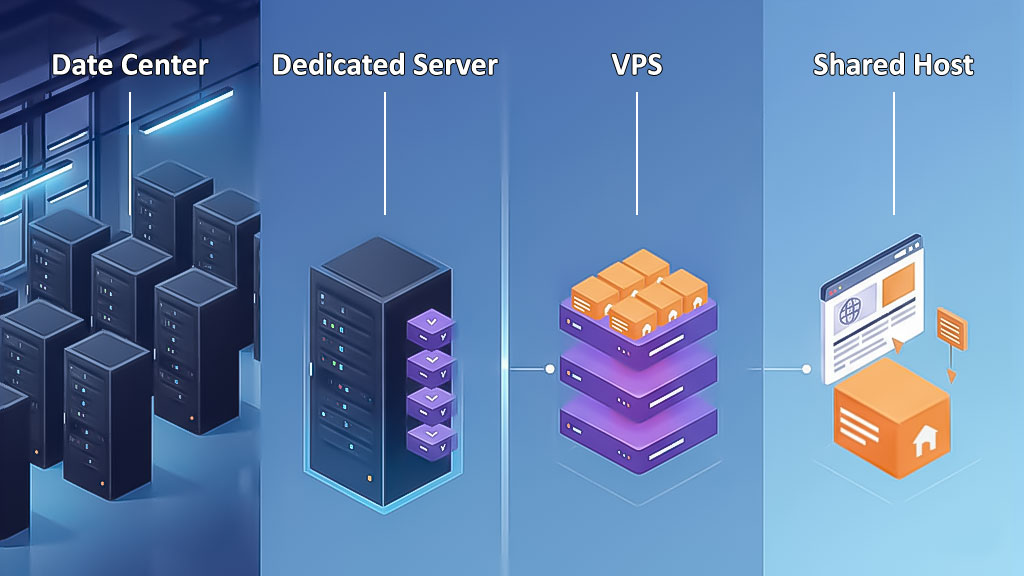
What Is a Data Center?
A Data Center is a secure facility that houses servers, networking equipment, power systems, and cooling infrastructure to keep websites, applications, and online services running reliably.
It provides high bandwidth connectivity, backup power, advanced security, and disaster resilience. The location and infrastructure of a Data Center directly affect performance, reliability, and latency, making it an important factor when choosing VPS or other hosting services.
What Is a Dedicated Server?
A dedicated server is a physical server fully allocated to a single user or organization. Unlike VPS or shared hosting, all hardware resources; including CPU, RAM, storage, and bandwidth; are reserved for one client.
Dedicated servers offer:
- Maximum performance and security
- Full control over configuration and software
- Ideal for high traffic websites, enterprise applications, and resource intensive projects
What Is a VPS?
A Virtual Private Server (VPS) is a virtualized server created from a dedicated physical server using virtualization technology. Each VPS has its own operating system, dedicated resources, and administrative access.
Think of a VPS like renting a unit in a building: you have full control of your space and resources, while shared infrastructure like hallways or elevators (bandwidth) is used by others.
Key features of VPS include:
- Dedicated resources (CPU, RAM, storage), with bandwidth sometimes shared
- Superuser/admin access to install software and run custom configurations
- Upgradeable resources as your website or application grows
- Flexible billing periods: monthly, quarterly, semi annual, or annual
- Optimal performance with a stable internet connection and server location close to users
VDS (Virtual Dedicated Server) is essentially the same as VPS. Operating systems like Windows, Linux, and Mikrotik can be installed depending on your needs.
What Is Virtualization?
Virtualization is a technology that allows a single physical server or computer to run multiple operating systems at the same time by dividing its hardware resources; such as CPU, RAM, and storage into separate virtual environments.
It creates virtual machines (VMs) that act like independent computers, each with its own operating system and allocated resources. On servers, virtualization is used to split one physical machine into multiple virtual servers, improving resource efficiency, flexibility, and cost savings.
This approach enables better hardware utilization while reducing infrastructure expenses.
What Is Shared Hosting?
Shared hosting allows multiple websites to share the resources of a single server. It is cost effective and easy to use, making it ideal for small websites, blogs, or businesses with moderate traffic.
While server resources are shared among users, shared hosting makes websites accessible worldwide without requiring technical server management.
Better To Buy A Shared Host Or A VPS?
When choosing between shared hosting and a VPS, three main factors should be considered: security, resources, and root access.
Security: Shared hosting shares the server among multiple websites. If one site has security vulnerabilities, it can affect others. VPS provides isolated environments, allowing stronger security measures and ensuring other users cannot impact your server.
Resources: In shared hosting, server resources (CPU, RAM, storage) are shared, so other sites can slow down your website. VPS offers dedicated resources, ensuring consistent performance and speed.
Root Access: VPS gives full root/admin access, enabling customization of the server and software. Shared hosting limits access and customization options.
Summary:
- Shared hosting is cheaper but suitable only for low traffic websites or beginners.
- VPS provides dedicated resources, higher performance, full customization, and better security, making it ideal for high traffic sites, businesses, and professional applications.
- VPS flexibility and control surpass shared hosting, making it a smarter choice for demanding users, including trading or financial platforms.

How To Create A VPS?
To create a virtual private server, several virtual servers are created by dividing a dedicated server with the help of virtualization technology. By sharing a dedicated server and its resources, we have a virtual server with features similar to a dedicated server and more affordable. The server administrator can provide dedicated resources for each section based on customer needs.
To better understand VPS, we gave an example of a large residential complex as a server and its units as a VPS. And each VPS has its own secure and dedicated space; Which means you will have a server with a dedicated hard drive, RAM, and CPU.
as people can make changes in their units In VPS, management is also the responsibility of the manager, and with ROOT or Administrator access, you can manage the security and speed you need without the intervention of other sources, And also have your favorite operating systems such as Linux or Windows.
As a result, in the same way, that we explained, you can use the features of the virtual server and have a secure virtual server with the desired operating system and administrator access without the need for initial server configuration.
VPS Use Cases
A Virtual Private Server (VPS) is used when shared hosting is no longer sufficient, but a dedicated server is not yet necessary. It provides dedicated resources, flexibility, and remote management, making it suitable for a wide range of professional applications.
- Website Hosting for Growing Projects: Hosting high traffic or expanding websites with dedicated resources.
- Email Server: Running custom mail servers to send large volumes of emails without shared hosting limits.
- Application Hosting: Hosting custom applications requiring 24/7 uptime and remote access.
- Database Server: Managing large databases securely with sufficient storage and backups.
- Development and Code Management: Providing environments for coding, testing, and collaboration.
- Performance Optimization: Distributing services across VPS instances for stability and speed.
- VPN and Secure Access: Creating private VPNs with dedicated IPs for better security and performance.
- Game Server Hosting: Hosting private or modded game servers with lower latency for players.
- Forex and Cryptocurrency Trading: Maintaining stable, low latency connections for financial trading.
- Code Testing and Staging: Deploying staging environments for testing applications from multiple locations.
- Hosting Websites (Expanded): Supporting high traffic blogs, media, or corporate sites beyond shared hosting limits.
- Dedicated Server Application: Running specific software with guaranteed resources without a full dedicated server.
- Database Server without Size Limit: Hosting enterprise level or large datasets without storage restrictions.
- Code and Project Management: Managing collaborative projects and multiple development teams remotely.
- Improving Website Performance: Separating web, database, and email services to enhance speed and uptime.
- VPN Replacement: Providing high speed dedicated VPN service as a superior alternative to public VPNs.
- Game Server: Optimizing gaming experience and developer testing for private game environments.
- Digital Currency Transactions: Ensuring uninterrupted and fast connections for crypto or Forex trading.
- Test Programming Codes: Offering flexible environments for testing, debugging, and deploying code projects.
When Do We Need To Use A VPS?
Choosing the correct server for your activity becomes clear after launching the site. Over time, you realize that you are facing problems and the server you selected is not compatible with the goals and needs of your site. The question may arise as to when VPS is the right choice for your needs; In the following, we will explain the cases that you find out when it’s time to switch your server to VPS.
1. When site security is a significant factor for you.
VPS is the best option to use more monitoring capabilities and increase site security. If you sell products or services on your site and have payment steps, use a VPS to improve safety.
2. If your site traffic is growing and expanding.
If you use shared hosting to host your site and your site traffic is rising daily; In this situation, shared hosting can not have an efficient Performance, and even with increasing traffic and user input to the site due to poor management of shared hosting, your site may become inaccessible. So pay attention to the issue that if your site will have more traffic and is developing, VPS can be useful.
3. If you have an online store.
VPS is the best option for online stores because having a proper and secure server is essential to protect credit cards against data theft. Using a secure VPS and its admirable security features, online payment steps will be performed without worries.
4. When the site speed decreases.
If you have set up your site on shared hosting; In fact, several sites use the same source and RAM, which definitely has a negative effect on the speed of the site. In your opinion, with the increase in content and visits to your site, will shared hosting have a desirable performance? Of course not, you will face problems.
VPS will provide good conditions for developing and improving the quality and content of your site.
5. When you encounter more errors from the server.
Seeing errors such as Service Unavailable, X50, and Internal server error from the server indicates that it is time to change the server. These server-side problems will be problematic in the process of your activity, and it is better to fix them immediately, as VPS can be a solution to this problem.
6. If you want to install custom software.
Having shared hosting can be a good choice for users of content management systems such as WordPress, but if you need a dedicated content management system and need to make custom settings to gain more control over your hosting, The VPS is more efficient for this request. Also, shared hosting can not support advanced applications well.
7. If the purpose of your activity on the site is to provide services.
A VPS with sufficient RAM and proper performance and providing multiple domains for all websites that provide services to customers; is beneficial and Appropriate.
8. If you do not have enough money to buy or rent a dedicated server.
Because the cost of renting a VPS is higher than a shared host, but it has an important differences from a shared host. It is also more affordable than a dedicated server while offering the same features.
If you don’t have enough budget to set up a site, VPS is the right choice. Still, by increasing the income, a dedicated server can be a better option in the future to solve site problems and increase security and resources. But try not to neglect VPS to set up the site to prevent future problems.
Managed VPS vs Unmanaged VPS
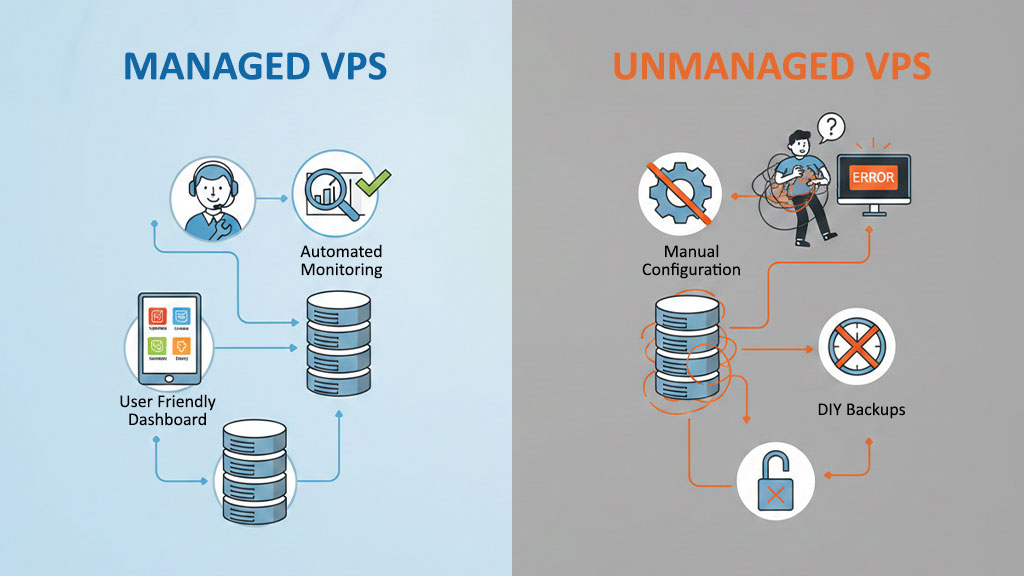
What is managed VPS
By managed VPS server, it’s the server that you use, but the controls for executing and installing and managing software and server security details and maintenance are entire is the responsibility of the service provider. Managed server means that you have no worries about server setup and maintenance as well as updates and troubleshooting.
As you know, server management is very specialized, and it is highly recommended that you leave it to experienced experts.
it is easy to use in comparison with a shared host but it has more features and resources, better security, and also faster speed.
In other words, the company which is the hosting service provider is responsible for installing the required software, being perfect, functioning properly, and servicing the server. Many people choose a managed server because it is ideal for users with no server management expertise. Generally, this type of server service is a bit more expensive than an unmanaged server.
What is unmanaged VPS
This type of server is similar to a dedicated and managed VPS. The main difference between these two is that, in this case, you need to install the necessary software on the server and support and manage the server, which for someone just getting started, may not be possible to do.
On unmanaged servers, you only hire a cheaper server, but the reliability and security of the managed server are much higher because you benefit from the expertise of highly experienced experts, which is excellent for corporate and business applications.
Many things are much more valuable and affordable. That’s why managed server hosting is a little more expensive. Another difference between a regular server and an unmanaged server is your ability to master the server. On an unmanaged server, you rent the server and take full control of it, but on a managed server, you don’t have to worry about maintaining and updating the server, which is a specialized job.
When buying an unmanaged VPS, do not forget that no special services will be provided and only the initial preparation for creating and installing the operating system will be done for you.
VPS Advantages vs Disadvantages
VPS Advantages
- Despite offering similar features to a dedicated server, it is more affordable.
- Reliable and stable.
- Due to the allocation of resources (RAM, CPU, and memory) has a fast and good performance, which increases the loading speed, processing power, and capacity of the website.
- It has better security due to the separation of resources in the virtual server; Because in the VPS, you can control users’ access in different sections, and no one can access your database.
- It is possible to customize the software in VPS, and you can adjust your VPS according to the required bandwidth and resources and the disk space required by your website.
- In VPS, root access is available to users to have more control over server processes.
Flexibility and upgrade of resources (storage memory, RAM, CPU) and applications in VPS are attractive advantages of virtual servers.
VPS Disadvantages
- Server management and configuration require technical knowledge, and beginners in managing it faces problems that require being experts or hiring a specialist team.
- It costs more than shared hosting.
- Server maintenance and the process of fixing it are time consuming and difficult.
- If the server is not configured properly, it will be vulnerable in terms of security, so you need to make settings to provide more security.
- It has less power and function than a dedicated server and will perform poorly for websites with very high traffic and high traffic.
Monetize With VPS
You may not realize the importance of VPS in your business yet, but it can help you make money.
VPS reduces your costs; A startup business may not be able to afford the high cost of a dedicated server, but it saves money by buying a VPS and can benefit from the same capabilities as a dedicated server. By estimating the cost of a VPS compared to a dedicated server over a year, you will find out how much you have saved.
If you sell services or products with VPS, you can increase your sales to some extent because the optimal speed of the server will satisfy the customers who visit your site. Undoubtedly, users who enter your site to buy the product and are faced with slow speed and delay in loading the site pages will not stay on your site and will leave your site quickly.
With this situation, you will lose your customers, and your SEO will decrease., because speed is the most important factor for SEO and Google, and users leave the site without spending time on it, and your site visitors and traffic is reduced; Therefore, VPS has an effect on improving SEO and attracting customers.
The excellent performance and quality of VPS also play an important role in cryptocurrency transactions; As you know, every moment and speed of action in digital currency transactions is essential, so slow and disconnected communication can lead to huge financial losses, so if you are active in the financial markets, it is time to change the shared hosting to VPS.
How To Choose The Proper VPS?
Before buying a VPS, have a thorough knowledge of its types. For example, if you do not know anything about servers and prefer to focus on other elements of your organization, a managed shared hosting may be right for you. On the other hand, if you want to make the changes you want to the server, a VPS with root access may be right for you.
many different criteria make them effective in choosing the right VPS; In the following, we will examine the main cases:
RAM: Depending on the need of your VPS and your operation, the amount of RAM required also varies, the amount of RAM you choose is also one of the essential factors in determining the price of VPS!
Storage: The amount of space you choose can also significantly impact the cost of your VPS service; it is better to provide the right amount of space according to your needs.
CPU: When buying a VPS, you should remember that the virtualizer’s processor is one of the processors of physical servers. Therefore you have to choose a suitable processor to achieve your goals, Be careful enough to determine the amount you need to either save on your expenses or not get less than you need.
Reasons That You Have To Choose OperaVPS Server?
1. You do not need to be fluent in Linux!
When you buy VPS, you first need to install the right operating system for it, which is often recommended because of the greater security of Linux.
Once you have selected the desired Linux version, it’s time to install it on the VPS, and then you have to do the firewall configuration and block unauthorized access to the server!
Leave all this to the technical experts of the OperaVPS support department and use your server as efficiently as possible.
2. Forget working with frameworks
Imagine running a program with the Laravel framework; as you know, you need to install nmp and composer on the server to run it; But this is not the only case and you have to install and configure PHP and possibly Apache.
You are probably aware that installing and configuring all of these has its difficulties and does not end with Laravel alone.
If you have any problems in your installation path, you can leave these steps to us so that we can do these services for you, and you will only enjoy the development and progress of your work!
3. An expert is with you at all times
It is enough to delete your site or endanger your site database with a wrong deletion or a wrong command. Such a bitter incident may lead you to start again from scratch, But do not worry, our specialists are ready to be by your side and protect your data.
4. DDoS Protection
Our firewall systems dynamically detect incoming and outgoing brute force and DDoS attacks, immediately respond to them and take the appropriate actions to block them.
5. Flexible Hardware
Using OperaVPS remote desktop server, you can upgrade your RDP’s resources and vigor if needed without losing any data; We care about your data safety.
FAQ
Is VPS secure?
VPSs are good in terms of security, but we can not be told that they are 100% safe against dangers and threats. It is necessary to increase the security level of the virtual server by making a series of settings; For example, set your firewall to restrict access to essential services and prevent all information from being displayed to everyone; Use strong and secure passwords and disable Superuser login to the server; Make the most use of LFD; Manage user access; Add ModSecurity to the firewall, and settings like this can affect the security of the virtual server.
How to connect to Windows Server from your system?
Go to the Start menu, type RDP, select Remote desktop, type your server's IP address, and click Connect. Then type the requested password and username and connect to Windows Server. also You can learn how to connect to Windows VPS step by step from our article in the blog section.
How many IPs Can Be Provided On A VPS?
You can add different IPs to your virtual server; There is no limit to the number of IPs you can use.
How Many Sites Can We Host on A Virtual Server?
If you manage the VPS yourself, you can host multiple sites on one VPS depending on the server resources.
Be sure to notify your server vendor support before adding a new site!
Can we change the operating system on VPS?
You will be able to change the type of operating system of your service; For example, if you have a Windows server, you can change the types of Windows operating systems; Not change the server operating system to Linux!
You can send a ticket to the support department and then your VPS operating system will be changed in a few steps.
How can I backup my VPS?
You can back up your data on Windows VPS and Linux Servers manually Note that if you have not previously made a backup on any VPS server, contact the support department so they can do it for you.
How does a VPS work?
VPS uses virtualization technology to create multiple isolated virtual servers on one physical machine. Each VPS has its own OS and resources, managed independently.
What is the difference between VPS and shared hosting?
Shared hosting uses the same resources across multiple users, which can affect performance. VPS offers dedicated resources and better control for growing websites and applications.
What is the difference between VPS and shared hosting?
Shared hosting uses the same resources across multiple users, which can affect performance. VPS offers dedicated resources and better control for growing websites and applications.
What is the difference between VPS and dedicated servers?
Dedicated servers provide full hardware access, while VPS delivers similar performance virtually on shared hardware, usually at lower cost.
What is the difference between VPS and VPN?
A VPS is a server hosting platform, while a VPN is a network tool that encrypts your internet traffic for secure connections.
Do I need programming knowledge to use a VPS?
Basic VPS usage does not require coding skills. Advanced management, custom software installation, or server optimization may need programming knowledge.
How many websites can I host on a VPS?
The number of websites depends on the server’s resources (RAM, CPU, storage) and website traffic.
Can I install custom software on my VPS?
Yes, VPS gives root/administrator access, allowing installation of custom software and applications.
What control panels can I use to manage VPS?
Popular options include cPanel, Plesk, DirectAdmin, Webmin, and Virtualmin.
How do I connect to my VPS?
- Linux VPS: via SSH
- Windows VPS: via RDP
Can VPS be used for Forex or Trading platforms?
Yes, specialized VPS plans provide low-latency connections and stability for trading software. ([link to separate guide])
What is a VNC server on VPS?
VNC allows remote desktop access to your VPS for GUI-based management. ([link to separate guide])
Why is server location important?
Closer server locations reduce latency, improve site speed, enhance user experience, and may benefit SEO.
How do I choose the right VPS?
Consider RAM, CPU, storage type, operating system, server location, and expected workload.
Why choose OperaVPS?
OperaVPS offers 24/7 support, scalable VPS plans, high performance, and global server locations.
Sangat bermanfaat memiliki beberapa server terpisah dalam satu server fisik khusus dengan sistem operasi yang berbeda.Regard